Three seconds from thought to text.
No app switching, no copy and paste. Sayvy lives in your menu bar and works wherever your cursor is.
Hold fn
Or any key or combination you like — a single modifier such as Right ⌥ works too. Double-tap for hands-free.
Speak naturally
Ums, false starts and "actually, make that 6" are fine. Whisper quietly in an open-plan office — it still hears you.
Let go
Clean, punctuated text in the right tone appears at your cursor — in Mail, Slack, Notes, your code editor, anywhere.
Everything in one tidy window.
Sayvy lives in your menu bar. Open it to see your history, teach it your words and read your meeting notes.
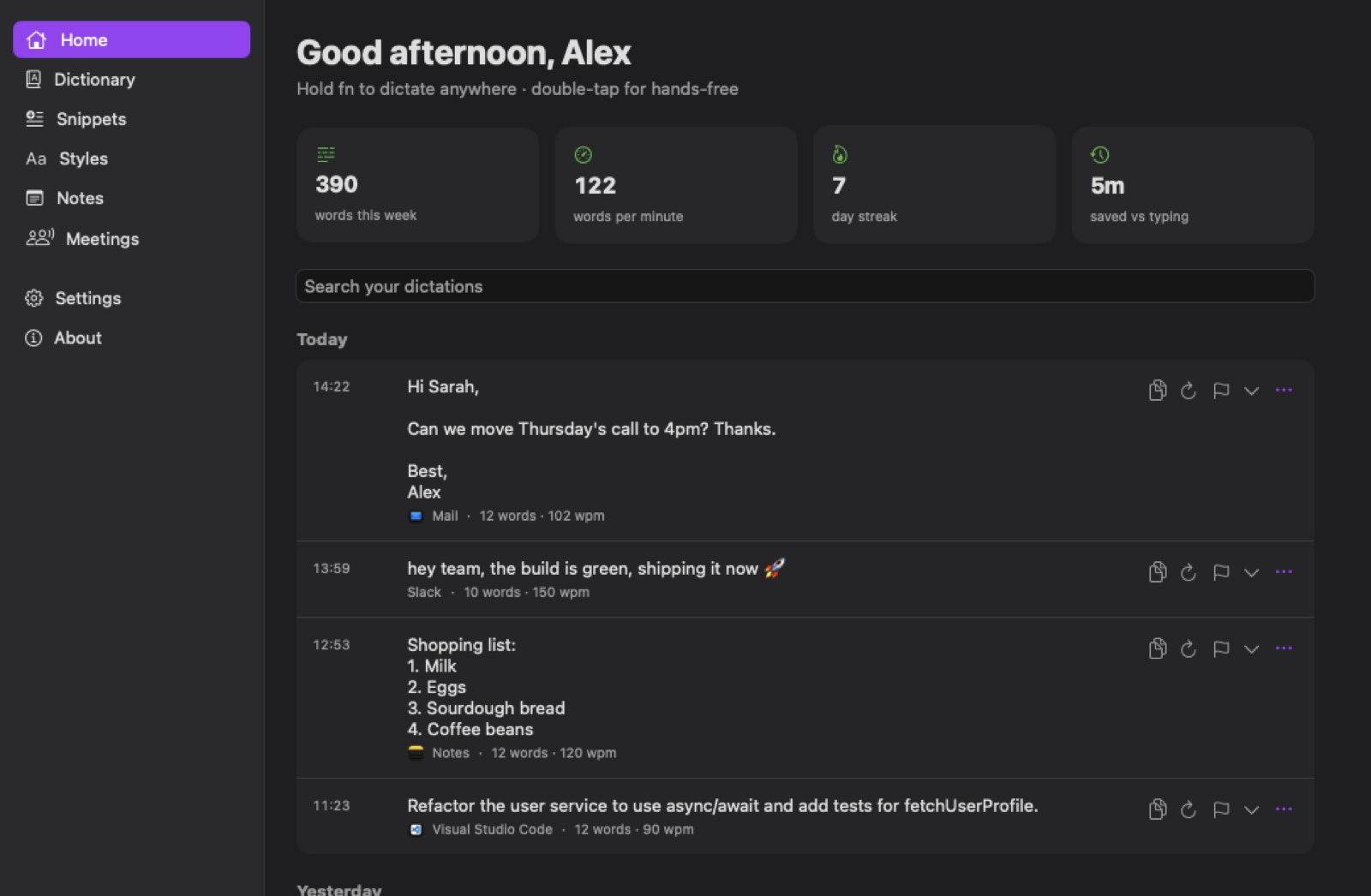
Home: everything you've dictated, searchable, with your words per minute, streak and time saved.
Real screens from the app, shown with example content.
Everything you'd want.
Nothing you have to pay for.
The polish of the best dictation apps — without accounts, subscriptions or word limits.
AI clean-up that keeps your voice
Removes fillers and false starts, applies your self-corrections, adds punctuation and turns spoken lists into real ones — without rewriting what you meant.
Private by design
Speech recognition runs on your Mac with Whisper. Clean-up uses Apple Intelligence on-device. Nothing leaves your Mac unless you choose a cloud model.
The right tone for every app
Formal in email, casual in Slack, very casual with friends. Developer mode keeps camelCase and file names intact in your editor.
Learns your words
Add names and jargon to your dictionary — or just fix a word once after dictating and Sayvy remembers it.
Snippets
Say "my calendar link" and get the whole thing. Up to 4,000 characters behind any short spoken trigger.
Command Mode
Select text, hold fn ⌃ and say "make this more formal", "turn into bullets" or "translate to French".
Meeting notes
Records Zoom, Teams, Meet or in-person meetings — or any video playing on your Mac — then writes a summary with decisions and next steps.
100+ languages
Auto-detects what you're speaking, or switch between your languages with one click on the Flow Bar.
In sync across your Macs
Your dictionary, snippets, notes and styles follow you through your own iCloud Drive. No account, no server.
Bring your own AI
Already run a local LLM? Sayvy uses Ollama, LM Studio, llama.cpp or oMLX automatically when it's running. Claude and OpenAI work with your own key.
Always up to date
New versions install themselves quietly while you're away from your desk — each one checked against its signature first.
Your voice stays
on your Mac.
Sayvy has no accounts, no analytics and no servers of its own. The only thing it ever downloads is the speech model and its own updates.
- On-device speech recognition (Whisper Large v3 Turbo)
- On-device clean-up with Apple Intelligence
- History kept only as long as you choose — or never
- Sync only through your own iCloud Drive
- API keys stored in your Mac's keychain
Up and running in five minutes.
A short setup guide walks you through everything the first time you open it.
Install
- Download and open the DMG, then drag Sayvy into Applications.
- Open Sayvy. The first time, macOS says Apple "could not verify" it — click Done, then open System Settings → Privacy & Security, scroll down and click Open Anyway. You only do this once. (Sayvy is a free app that isn't sold through Apple, so Apple hasn't checked it.)
- Allow Microphone and Accessibility when the setup guide asks — that's how it hears you and types for you.
- Let the speech model download (632 MB, once). Turning on Apple Intelligence gives the best clean-up.
- Hold fn and talk. Tip: set Keyboard → "Press 🌐 key to" → Do Nothing.
Requirements
- MacApple Silicon (M1 or later)
- macOS26 Tahoe or later
- Disk spaceAbout 700 MB
- PriceFree
Always getting better.
Sayvy 1.3.6
Release notes load here.